Features

Everything you need to call a live show. Nothing you don't.

showrun is opinionated on purpose: it's the rundown, the timing engine, and the calling surface — built to be calm under pressure, fast to edit, and trustworthy when the connection isn't.
app.showrun.nl
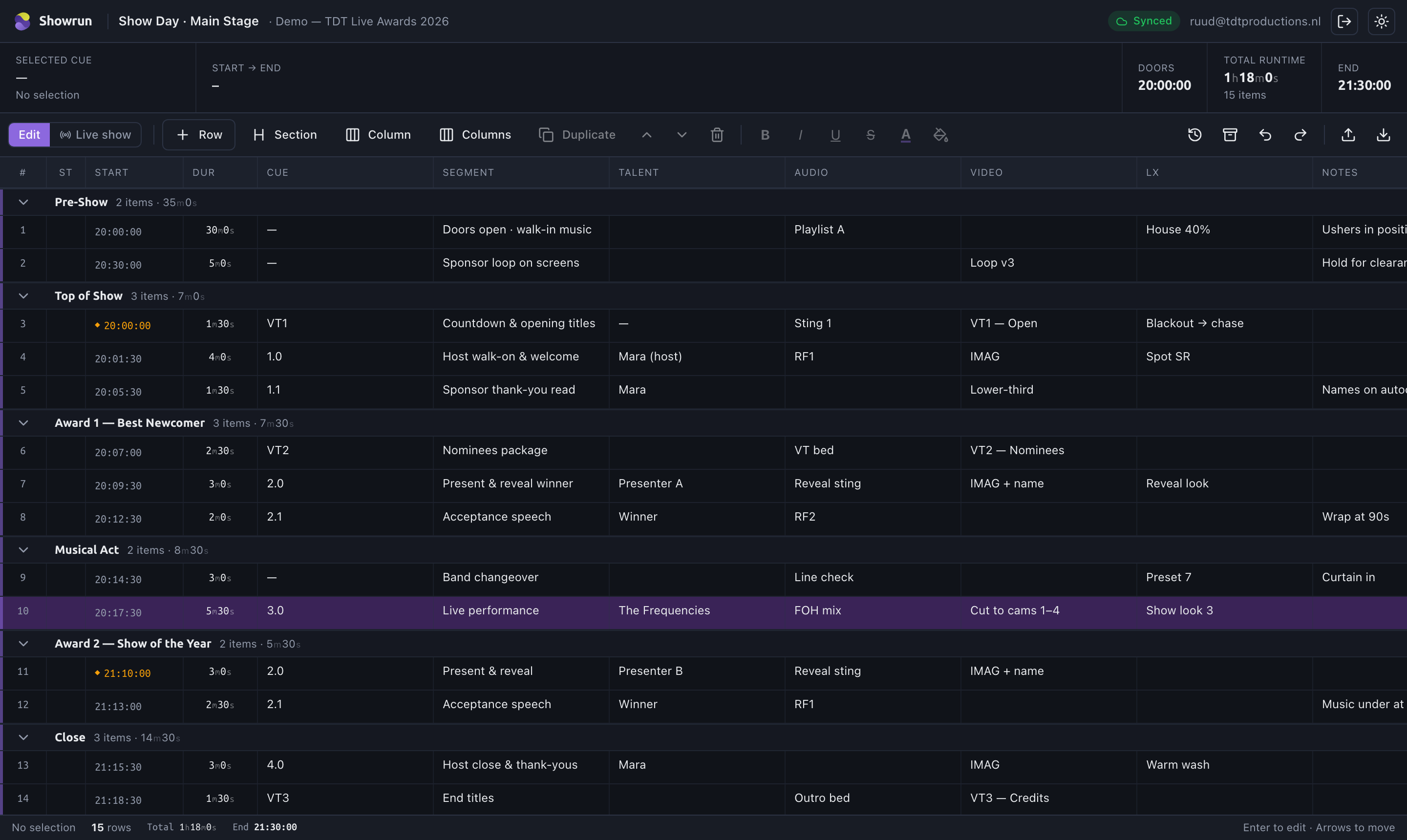
The showrun rundown grid with sections, computed start times, durations and crew columns.
The grid

As fast as a spreadsheet, built for cues

Rows are cues, columns are whatever your show needs. It's a real, high-performance grid — paste a hundred rows, drag columns into a new order, colour-code by department, and it stays instant.
  • Click any cell and type. Light rich text — bold, italic, underline, strikethrough and a full colour palette.
  • Drag to reorder rows and columns. Hide, rename, insert or delete columns per person — your layout, shared data.
  • Group cues into sections that total their own time and collapse out of the way.
  • Find & replace across the whole rundown. Built to stay smooth at 800+ rows.
edit
Editing cells in the showrun grid.
live
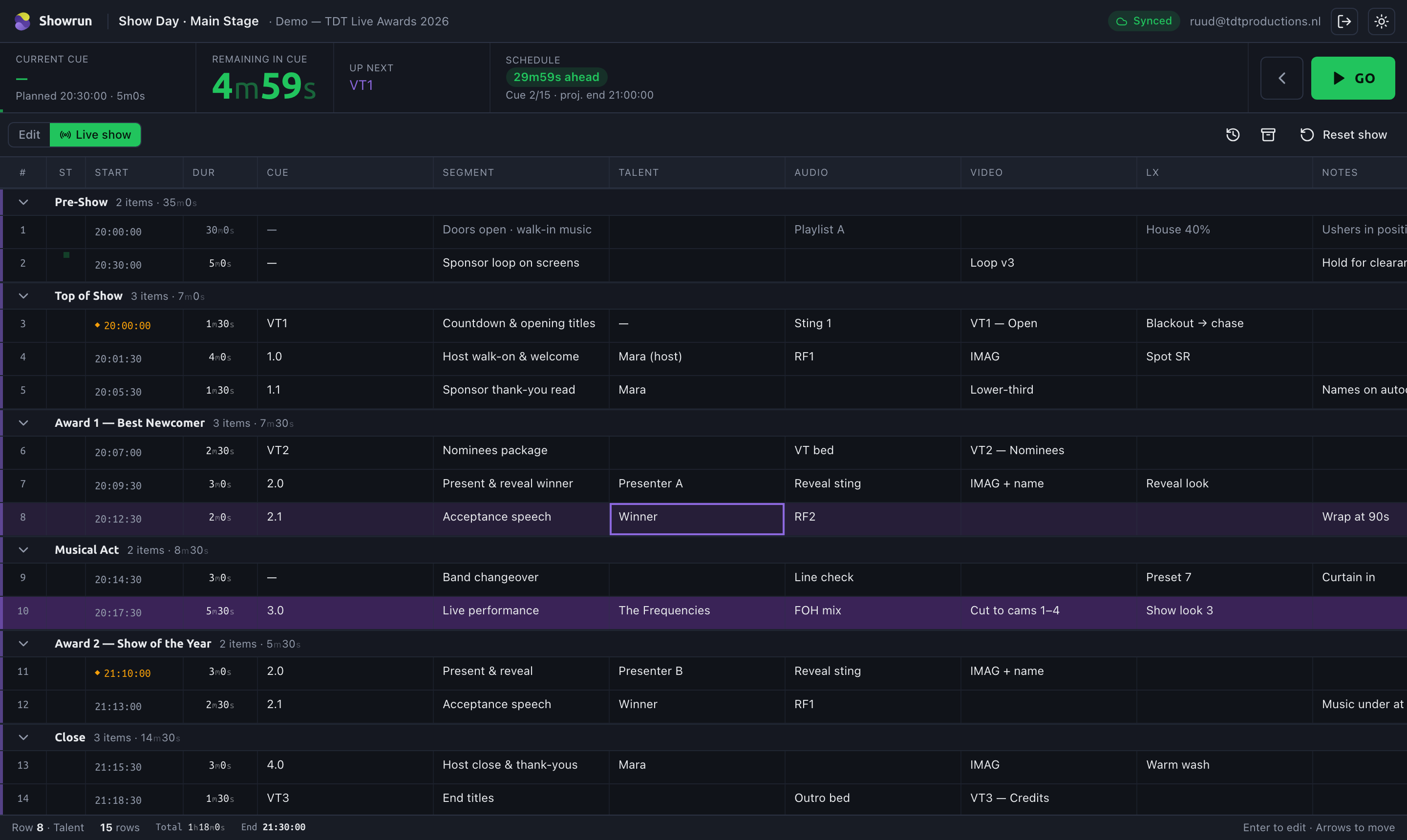
The live countdown and schedule drift in showrun.
Timing & calculations

The clocks add themselves up

Enter durations and a start time; showrun derives every clock the moment anything changes — no manual re-timing.

  • Time-of-day, running time, cumulative totals and total runtime — all live.
  • Hard times and back-timing: set a hard end and showrun tells you where you're running long or short.
  • Editable doors / start time right in the header — change it and the whole show re-times.
● Standby → Go

A calling surface, not just a document

Flip to Live and the rundown becomes the thing you run the show from. Arm the next cue, hit Space, and it takes — advancing with you.

  • Standby & Go transport with a big, unmissable live countdown.
  • Live status on every cue — ready, standby, live, done — and exact schedule drift.
  • Click any cue to jump. Multiple showcallers can each run a different rundown at once.
live mode
showrun live calling mode with GO button and countdown.
Team & trust

Built for a crew, on site or off

Realtime read-along

Everyone on the same rundown sees edits the instant they happen. No emailed versions, no "is this the latest?"

Roles & private notes

Owner, showcaller, crew and viewer roles. A private notes lane only you can see — your blocking and cues stay yours.

Offline-first

Keep editing with no connection for hours. Changes sync automatically the moment you're back online.

Change history

An attributed, append-only log of who changed what and when — undo any single edit, no mystery changes.

Local autosave & backup

Automatic local snapshots plus an exportable .showrun file — recover your show even after a crash.

Client logo & PDF

Drop a client logo on each show; it rides the editor header and your PDF export. Hand something polished over.

showrun never fires your cues. It's the rundown and the calling surface — a human reads and calls the show. That's a feature, not a gap: no automation surprises five minutes to air. Integrations for teams who want them are on the roadmap below.

Honest roadmap

Live today vs. on the way

We'd rather tell you straight. Here's what's in your hands now and what we're building next.

Live now

  • The grid: rich-text cells, drag rows & columns, sections, find & replace
  • Derive-on-read timing, hard times & back-timing
  • Live Standby/Go calling mode + schedule drift
  • Realtime read-along, roles, private notes, change history
  • Offline editing, local autosave, client logo, runs in your browser

● Coming

  • Followers auto-tracking the caller's live cue across the team
  • Native Mac & Windows apps for rock-solid offline calling
  • Polished mobile read & follow layout
  • Typed columns & shared custom colour palettes
  • Phase 2: timecode, OSC & Companion for teams who want them

See it on your own show.

Free during the beta — build a rundown and call something.